Showing posts with label AWS. Show all posts

Thursday, 21 May 2020

Docker

Docker Installation on AWS EC2

```
sudo apt install docker.io
sudo systemctl enable --now docker
docker -v
```

Other way to Install Docker Engine. Search get docker install script. it will get from https://get.docker.com/
# This script is meant for quick & easy install via:
```
$ curl -fsSL https://get.docker.com -o get-docker.sh
$ sh get-docker.sh
```

#List container
sudo docker container ls    => show all runing container
sudo docker container ls-a  => show all container
sudo docker container ls -aq   => shows all container ids only


#Pull docker image on local machine from docker hub.
sudo docker run hello-world
sudo docker pull openjdk
sudo docker pull jenkins
sudo docker pull mysql
sudo docker pull nginx
sudo docker pull wordpress

#Remove docker images available on local machine from docker hub registery.
sudo docker image rm openjdk
sudo docker image rm jenkins
sudo docker image rm mysql
sudo docker image rm nginx
sudo docker image rm wordpress

#Remove all containers from machine.
```
sudo docker container rm $(sudo docker container ls -aq)
```

#create and run container
sudo docker container run hello-world
sudo docker container run openjdk
sudo docker container run jenkins
sudo docker container run mysql
sudo docker container run nginx
sudo docker container run wordpress


#Run container in background / detached mode and print container ID
sudo docker container run -d hello-world
sudo docker container run -d openjdk
sudo docker container run -d jenkins
sudo docker container run -d mysql
sudo docker container run -d nginx
sudo docker container run -d wordpress

#Other Commands
sudo docker container start <container id> - it will run container in background
sudo docker container stop <container id> -stop container


#For customer TCP ports i will use 8001 onward.

# Nginx(latest) = 8001
# Nginx(old version using tag) = 8002
# Tomcat(latest version)= 8005
# Tomcat(old version)= 8006
# Jenkins= 8010
# Jenkins (old version) = 8011

#Run Nginx as container in EC2 machine and port it to access in parent machine.
sudo docker container ls -a
sudo docker container rm $(sudo docker container ls -aq)
sudo docker container ls -a
sudo docker run --name mynginx1 -p 8001:80 -d nginx:latest
sudo docker run --name mynginx2 -p 8002:80 -d nginx:1.17.10
sudo docker container ls -a


Open Port in host machine. In my case i am using AWS EC2 and below are the steps to allow ports.


My Nginx Server is up and running now from inside container.


## run tomcat on AWS EC2 and port
sudo docker run -p 8005:8080 -d tomcat
Inbound Rules > Custom TCP    TCP    8005    0.0.0.0/0

## run tomcat on AWS EC2 and port
sudo docker run -p 8006:8080 -d tomcat:8
Inbound Rules > Custom TCP    TCP    8006    0.0.0.0/0


## install latest jenkins version on AWS EC2 and port it
sudo docker container run --name myjenkin1 -p 8010:8080 -d jenkins
sudo docker container run -it jenkins /bin/bash
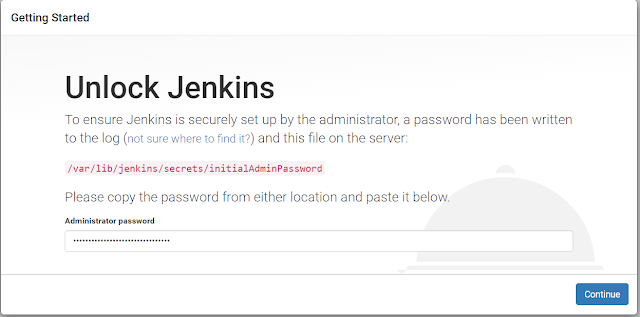
sudo docker exec <container> cat /var/jenkins_home/secrets/initialAdminPassword
d5fbefc49d754b928345263fc2183331
Inbound Rules > Custom TCP    TCP    8010    0.0.0.0/0

## install old jenkins version on same machine
sudo docker container run --name myjenkin2 -p 8011:8080 -d jenkins:1.609.2
sudo docker logs <container>
Inbound Rules > Custom TCP    TCP    8011    0.0.0.0/0


Monday, 4 February 2019

How to plan IP Address

Consider the below questions in mind before planing out IP Addresses scheme for their network:
1.  How many IP Addresses do you need today?
2. How many IP Address will need in the future?
3. Do you have pre-existing IP scheme?

Rules for IP Addressing:

1. Each of the 4 numbers in an IP address is called and (8bits) -192.168.10.110
2. A bit is a 1 or a 0.
3. Each octet can only have a number from 0 to 255
- 00000000 = 0
- 11111111 = 255

4. The first octet cannot be 127.
5. The 127 range has been reserved for diagnostics.
6. 127.0.0.1 is known as the loopback address. (It is referred to as localhost.)
7. The host id cannot be all 0's or all 255's
- All 0's represents the network Id.
- All 255's is the broadcast address
For Example:
-192.168.10.0 is a Network ID
-192.168.10.255 is the broadcast address for the 192.168.10.0 network.

What is classful IP Addressing?
-Originally IP Addresses where divided into different class ranges:
 
                               Network Id Reserved | Subnet Mask
A Class : 1-126         [N | H | H | H]   255.0.0.0            [126 Networks, 16,777,214 Hosts]
B Class :  128-191    [N | N | H | H]   255.255.0.0        [16,384 Networks, 65,534 Hosts]
C Class :  192-223    [N | N | N | H]   255.255.255.0    [2,097,152 Networks, 254 Hosts]
D Class :  244-239    Reserved for Multicast Address
E Class :   240-243    Reserved for Experimental

Total of 3,720,314,628 host addresses available


Private vs Public Addresses:
1. Private IP ranges which have been reserved from "Public Internet use" (not accepted by the internet routers and cann't travel internet if using below IP addresses):
-10.0.0.0       - 10.255.255.255
-172.16.0.0   - 172.31.255.255
-192.168.0.0 - 192.168.255.255

-169.254.0.0 - 169.254.255.255 [not used in private network, it reserved for automatic private IP addressing that computer self assigned itself)


2. Hosts assigned private IP Addresses can get to the internet through a technology called Network Address Translation (NAT)

3. Most of today's companies use private IP addresses on their private networks.

Example:
1. find out the Network ID, Broadcast ID, Number of usable IP address's for 11.200.200.200 ?
Ans.  It is in Class A
N | H | H | H
11 0  0  0  - Network ID
11 255 255 255  Broadcast ID
11 {8 bits}  0{8 bits} 0{8 bits} 0{8 bits} - 24bits available for host use
2 power 24 - 2 = Hosts
 
 
Helpful Link: https://www.youtube.com/watch?v=_ISu9f8ofZk

Sunday, 3 February 2019

AWS VPC - Amazon web services - virtual private cloud

Creating n-tier web based application architecture on aws vpc. Will have firewal rule for the servers to communicate on specific port for security purpose.

In DC:
Web Server - 2
Application Server - 2
Database Server - 2
Reporting Server - 2
File Server - 1

In DR:
Web Server - 2
Application Server - 2
Database Server - 2
Reporting Server - 2
File Server - 1


1.    By default 1 VPC available in each region
2.    By default 2 or more Availability Zones exists in each region i.e. “ap-south-1a” and “ap-south-1b”.
3.    By default, Each Availability Zone has 1 Public Subnet. So total 2 public subnet is available.
4.    We can create Private subnet in Availability Zone as mentioned in above image.
5.    Security Group – by default all ports will be blocked.
6.    Security Group – Ports need to open in security group for instance i.e. Http, SSH etc.
7.    By Default will have 1 Security Group
8.    By Default will have 1 Network ACLs
9.    Can block IP address in Network ACLs
10.    By default will have 1 Route Table when we create VPC
11.    By default will have 1 Internet Gateway
12.    All subnets will be connected to ACL’s and Route Tables
13.    All instance will be connected to Security Group.
14.    Go in “VPC Dashboard” > Your VPC > The IPv4 CIDR in VPS, specify the list of IP’s we can have in this VPC


15.    http://cidr.xyz/ to check range of IP’s
16.    Default Subnets.
17.    Instances connected with public subnet will have internet access.
18.    Instance connected with private subnet will not have internet access.
19.

20.    Instance > Subnet > Route Table > Internet Gateways = Instance having internet access and in Public Subnet
21.    Instance > Subnet > Route Table  = Instance don’t have internet access and in Private Subnet

How to plan IP Address


Exam Tips:
1.    VPC provision a logically isolated section of the AWS cloud where you can launch AWS resources in a Virtual network that you define.
2.    Complete control over virtual networking environment, including section of your own IP range, creation of subnets, and configuration and route tables and network gateways.
3.    You can use both IP4 and IPv6 in your VPC for secure and easy access to resources and applications.
4.    You can create a public facing subnet for your web servers
5.    Private subnet for application and database servers with no internet access.
6.    Can have multiple layers of security including security groups, network access control list (ACL) to help control access to EC2 instance.
7.    You can create HARDWARE VIRTUAL PRIVATE (VPN) connection between your corporate data center and your VPC and leverage the AWS cloud as an extension of your corporate data center.
8.    Pricing- this is free of cost service, however you will be charged for the resources you use.
9.    Subnet- where you define the small networks for your different requirements like Web Server subnet, DB Subnet etc.
10.    Route Table – here you define the routing paths with connecting subnets.
11.    Internet Gateway – it is used to provide the internet connectivity to your VPC resources. Only 1 internet gateway can be connected to 1 VPC.
12.    Egress Internet Gateway- Similar to internet gateway but used for IPv6 resources.
13.    Nat gateway/ Nat instances- similar to internet gateway but better choice to provide internet to your private subnet machines.
14.    VPC Peering- VPC peering is used to merge two or more VPC in same or different AWS accounts/ Subscription.
15.    Security Groups- Security groups are state full and works as firewall for instances. Rules works at instance level.
16.    NACL- network access control lists application on subnet and is stateless.
17.    Customer Gateway- you need to setup a supported device which will work as a onsite premises gateway for creating VPN.
18.    Virtual Gateway- VG will be created on AWS VPC side for setting up VPN.
19.    VNP Connection- once CG and VG ready, you can create a VPN connection.
20.    A variety of connectivity options exist for your amazon VPC. You can connect your VPC to the internet, to your data center, or other VPCs, based on the AWS resources that you want to expose publicly and those that you want to keep private.
21.    Connect directly to the internet (public subnets) - you can launch instances into a publicly accessible subnet where they can send and receive traffic from the internet.
22.    Connect to the internet using Network Address Translation (private subnets) - private subnets can be used for instances that you do not want to be directly addressable from the internet. Instances in a private subnet can access the internet without exposing their private IP address by routing their traffic through a network address translation (NAT) gateway in a public subnet.
23.    Connect securely to you corporate datacenter- All traffic to and from instances in your VPC can be routed to your corporate datacenter over an industry standard, encrypted IPsec hardware VPN connection.
24.    Connect privately to other VPCs – Peer VPCs together to share resources across multiple virtual networks owned by your or other AWS accounts.
25.    Privately connect to AWS services without using an internet gateway, NAT or firewall proxy through a VPC endpoint. Available AWS services include S3, Dynamo DB, Kinesis streams, service catalog, ec2 systems manager (SSM), Elastic load balancer (ELB) API, and Amazon Elastic compute cloud (EC2) API.
26.    Elastic IP address (EIP) - If you require a persistent public IP address that you can associate and disassociate at will, use an Elastic IP address (EIP) instead. You can allocate your own EIP, and associate it to your instance after launch.

Tuesday, 25 July 2017

Amazon Web Services - Storage - S3

S3 provides developers and IT teams with secure, durable, highly-scalable object storage. Amazon S3 is easy to use, with a simple web services interface to store and retrieve any amount of data from anywhere on the web.

  1. S3 is a safe place to store your files. 
  2. It is Object based storage.
  3. The data is spread across multiple devices and facilities.

S3 Basices:
  1. S3 is Object based i.e. allows you to upload files.
  2. Files can be from 0 Bytes to 5 TB.
  3. There is unlimited storage.
  4. Files are stored in Buckets.
  5. S3 is a universal namespace, that is, names must be unique globally.
  6. https://s3-eu-west-1.amazonws.com/<name of cloud>
  7. When you upload a file to S3 you will receive a HTTP 200 code if the upload was successful.
  8. Built for 99.99% availability for the S3 platform.
  9. Amazon Guarantee 99.9% availability
  10. Amazon guarantees 99.999999999% durability for S3 information. (Remember 11x 9's)
  11. Tiered Storage Available
  12. Lifecycle Management. 
  13. Versioning
  14. Encryption
  15. Secure your data using Access Control List and Bucket Policies.

Data Consistency Model For S3:
  1. Read after Write consistency for PUTS of new Objects.
  2. Eventual Consistency for overwrite PUTS and DELETES (can take some time to propagate)

S3 is a simple key, value store:
  •  S3 is Object based. Object consist of the following:
    • Key (This is simply the name of the object)
    • Value (This is simply the data and is made up of a sequence of bytes).
    • Version ID (important for versioning)
    • Metadata (Data about the data you are storing) 
    • Subresources
      • Access Control Lists
      • Torrent

S3- Storage Tiers/ Classes
  • S3 - 99.99% availability, 99.999999999% durability, stored redundantly across multiple devices in multiple facilities and is designed to sustain the loss of 2 facilities concurrently.
  • S3 - IA (Infrequently Accessed) for data that is accessed less frequently, but requires rapid access when needed. Lower fee than S3, but you are charged a retrieval fee.
  • Reduced Redundancy storage - Designed to provide 99.99% durability and 99.99% availability of objects over a given year.
  • Glacier- Very cheap, but used for archival only. It takes 3-5 hours to restore from Glacier.

                       Standard             Standard - Infrequent   Reduced Redundancy
                                                              Access                         Storage
============================================
Durability -----99.999999999%--------99.999999999%-----------------99.99%
Availability----------99.99%-----------------------99.99%------------------------99.99%
Concurrent facility fault tolerence
                  --------------2--------------------------------2----------------------------------1
SSL support-----------Yes------------------------------Yes-------------------------------Yes
First byte latency---Milliseconds-------Milliseconds---------------Milliseconds
Lifecyle Management Policies
                   ------------Yes-------------------------------Yes------------------------------Yes
============================================


What is Glacier?

Glacier is an extremely low-cost storate service for data archival. Amazon Glacier stores data for as little as $0.01 per gigabyte per month, and is optimized for data that is infrequently accessed and for which retrieval times of 3 to 5 hours are suitable.


S3 vs Glacier:

                       Standard             Standard - Infrequent   Amazon Glacier
                                                              Access                        
============================================
Designed for Durability-----99.999999999%----99.999999999%----99.999999999%
Designed for Availability---99.99%-----------------------99.99%--------------NA
Availability SLA-----------------99.9%-------------------------99%-------------------NA
Minumum Object Size--------NA-----------------------------128KB*--------------NA
Max. Storage Duration------NA-----------------------------30 days--------------90 days
Retrieval Fees-------------NA-----------------------------per GB retrieved--per GB retrieved**
First byte latency---Milliseconds-------Milliseconds-----------select minutes or hours**
Storage Class--------object level----------object level------------object level
Lifecycle Transitions---yes-----------------yes-------------------------yes
============================================


S3 - Charges:
  • Charged for-
    • Storage
    • Requests
    • Storage Management Pricing
    • Data Transfer Pricing
    • Transfer Acceleration 

Transfer Acceleration - Amazon S3 Transfer Acceleration enables fast, easy, and secure transfers of files over long distances between your end users and an S3 bucket. Transfer Acceleration takes advantage of amazon CloudFront's globally distributed edge locations. As the data arrives at an edge location, data is routed to Amazon S3 over and optimized network path.
JAPAN -> (bucket is Mumbai) <- London 
Singapore ->(bucket is Mumbai) <- Sydney


S3 - Exam Tips for S3
  • Remember that S3 is Object based i.e. allows you to upload files. 
  • Files can be from 0 bytes to 5 TB.
  • There is unlimited storage.
  • Files are stored in Buckets.
  • S3 is a universal namespace, that is, named must be unique globally
  • https://s3-eu-west-1.amazonaws.com/sgcloud
  • Read after write consistency for PUTS of new Objects.
  • Eventual Consistency for overwrite PUTS and DELETES (can take some time to propagate)
  • S3 - storage Classes/Tiers
    • S3 (durable, immediately available, frequently accessed)
    • S3 -IA (durable, immediately available, infrequently accessed)
    • S3 - Reduced Redundancy Storage (data that is easily reproducible, such as thumb nails etc).
    • Glacier - Archived data, where you can wait 3-5 hours before accessing. 
  • Remember the core fundamentals of an S3 object
    • key (name)
    • value (data)
    • Version ID
    • Metadata
    • Subresorces
      • ACL
      • Torrent
  • Object based storage only ( for files)
  • Not suitable to install an operating system on.
  • Successful uploads will generate a HTTP 200 status code.
  • Read the S3 FAQ before taking the exam. It comes up a lot!


S3 - Properties:
  1. Versioning
  2. Logging
  3. Static website hosting
  4. Tags
  5. Cross-region replication
  6. Transfer acceleration
  7. Events
  8. Requester pays      

Monday, 24 July 2017

Amazon Web Services - IAM Policy List

AmazonAPIGatewayAdministrator
AmazonAPIGatewayInvokeFullAccess
AmazonAPIGatewayPushToCloudWatchLogs
AmazonAppStreamFullAccess
AmazonAppStreamReadOnlyAccess
AmazonAppStreamServiceAccess
AmazonAthenaFullAccess
AmazonCloudDirectoryFullAccess
AmazonCloudDirectoryReadOnlyAccess
AmazonCognitoDeveloperAuthenticatedIdentities
AmazonCognitoPowerUser
AmazonCognitoReadOnly
AmazonDMSCloudWatchLogsRole
AmazonDMSRedshiftS3Role
AmazonDMSVPCManagementRole
AmazonDRSVPCManagement
AmazonDynamoDBFullAccess
AmazonDynamoDBFullAccesswithDataPipeline
AmazonDynamoDBReadOnlyAccess
AmazonEC2ContainerRegistryFullAccess
AmazonEC2ContainerRegistryPowerUser
AmazonEC2ContainerRegistryReadOnly
AmazonEC2ContainerServiceAutoscaleRole
AmazonEC2ContainerServiceEventsRole
AmazonEC2ContainerServiceforEC2Role
AmazonEC2ContainerServiceFullAccess
AmazonEC2ContainerServiceRole
AmazonEC2FullAccess
AmazonEC2ReadOnlyAccess
AmazonEC2ReportsAccess
AmazonEC2RoleforAWSCodeDeploy
AmazonEC2RoleforDataPipelineRole
AmazonEC2RoleforSSM
AmazonEC2SpotFleetAutoscaleRole
AmazonEC2SpotFleetRole
AmazonEC2SpotFleetTaggingRole
AmazonElastiCacheFullAccess
AmazonElastiCacheReadOnlyAccess
AmazonElasticFileSystemFullAccess
AmazonElasticFileSystemReadOnlyAccess
AmazonElasticMapReduceforAutoScalingRole
AmazonElasticMapReduceforEC2Role
AmazonElasticMapReduceFullAccess
AmazonElasticMapReduceReadOnlyAccess
AmazonElasticMapReduceRole
AmazonElasticsearchServiceRolePolicy
AmazonElasticTranscoderFullAccess
AmazonElasticTranscoderJobsSubmitter
AmazonElasticTranscoderReadOnlyAccess
AmazonElasticTranscoderRole
AmazonESFullAccess
AmazonESReadOnlyAccess
AmazonGlacierFullAccess
AmazonGlacierReadOnlyAccess
AmazonInspectorFullAccess
AmazonInspectorReadOnlyAccess
AmazonKinesisAnalyticsFullAccess
AmazonKinesisAnalyticsReadOnly
AmazonKinesisFirehoseFullAccess
AmazonKinesisFirehoseReadOnlyAccess
AmazonKinesisFullAccess
AmazonKinesisReadOnlyAccess
AmazonLexFullAccess
AmazonLexReadOnly
AmazonLexRunBotsOnly
AmazonMachineLearningBatchPredictionsAccess
AmazonMachineLearningCreateOnlyAccess
AmazonMachineLearningFullAccess
AmazonMachineLearningManageRealTimeEndpointOnlyAccess
AmazonMachineLearningReadOnlyAccess
AmazonMachineLearningRealTimePredictionOnlyAccess
AmazonMachineLearningRoleforRedshiftDataSource
AmazonMechanicalTurkFullAccess
AmazonMechanicalTurkReadOnly
AmazonMobileAnalyticsFinancialReportAccess
AmazonMobileAnalyticsFullAccess
AmazonMobileAnalyticsNon-financialReportAccess
AmazonMobileAnalyticsWriteOnlyAccess
AmazonPollyFullAccess
AmazonPollyReadOnlyAccess
AmazonRDSDirectoryServiceAccess
AmazonRDSEnhancedMonitoringRole
AmazonRDSFullAccess
AmazonRDSReadOnlyAccess
AmazonRedshiftFullAccess
AmazonRedshiftReadOnlyAccess
AmazonRekognitionFullAccess
AmazonRekognitionReadOnlyAccess
AmazonRoute53DomainsFullAccess
AmazonRoute53DomainsReadOnlyAccess
AmazonRoute53FullAccess
AmazonRoute53ReadOnlyAccess
AmazonS3FullAccess
AmazonS3ReadOnlyAccess
AmazonSESFullAccess
AmazonSESReadOnlyAccess
AmazonSNSFullAccess
AmazonSNSReadOnlyAccess
AmazonSNSRole
AmazonSQSFullAccess
AmazonSQSReadOnlyAccess
AmazonSSMAutomationRole
AmazonSSMFullAccess
AmazonSSMMaintenanceWindowRole
AmazonSSMReadOnlyAccess
AmazonVPCCrossAccountNetworkInterfaceOperations
AmazonVPCFullAccess
AmazonVPCReadOnlyAccess
AmazonWorkMailFullAccess
AmazonWorkMailReadOnlyAccess
AmazonWorkSpacesAdmin
AmazonWorkSpacesApplicationManagerAdminAccess
AmazonZocaloFullAccess
AmazonZocaloReadOnlyAccess
ApplicationAutoScalingForAmazonAppStreamAccess
AutoScalingConsoleFullAccess
AutoScalingConsoleReadOnlyAccess
AutoScalingFullAccess
AutoScalingNotificationAccessRole
AutoScalingReadOnlyAccess
AWSAccountActivityAccess
AWSAccountUsageReportAccess
AWSAgentlessDiscoveryService
AWSApplicationDiscoveryAgentAccess
AWSApplicationDiscoveryServiceFullAccess
AWSBatchFullAccess
AWSBatchServiceRole
AWSCertificateManagerFullAccess
AWSCertificateManagerReadOnly
AWSCloudFormationReadOnlyAccess
AWSCloudHSMFullAccess
AWSCloudHSMReadOnlyAccess
AWSCloudHSMRole
AWSCloudTrailFullAccess
AWSCloudTrailReadOnlyAccess
AWSCodeBuildAdminAccess
AWSCodeBuildDeveloperAccess
AWSCodeBuildReadOnlyAccess
AWSCodeCommitFullAccess
AWSCodeCommitPowerUser
AWSCodeCommitReadOnly
AWSCodeDeployDeployerAccess
AWSCodeDeployFullAccess
AWSCodeDeployReadOnlyAccess
AWSCodeDeployRole
AWSCodePipelineApproverAccess
AWSCodePipelineCustomActionAccess
AWSCodePipelineFullAccess
AWSCodePipelineReadOnlyAccess
AWSCodeStarFullAccess
AWSCodeStarServiceRole
AWSConfigRole
AWSConfigRulesExecutionRole
AWSConfigUserAccess
AWSConnector
AWSDataPipeline_FullAccess
AWSDataPipeline_PowerUser
AWSDataPipelineRole
AWSDeviceFarmFullAccess
AWSDirectConnectFullAccess
AWSDirectConnectReadOnlyAccess
AWSDirectoryServiceFullAccess
AWSDirectoryServiceReadOnlyAccess
AWSElasticBeanstalkCustomPlatformforEC2Role
AWSElasticBeanstalkEnhancedHealth
AWSElasticBeanstalkFullAccess
AWSElasticBeanstalkMulticontainerDocker
AWSElasticBeanstalkReadOnlyAccess
AWSElasticBeanstalkService
AWSElasticBeanstalkWebTier
AWSElasticBeanstalkWorkerTier
AWSGreengrassFullAccess
AWSGreengrassResourceAccessRolePolicy
AWSHealthFullAccess
AWSImportExportFullAccess
AWSImportExportReadOnlyAccess
AWSIoTConfigAccess
AWSIoTConfigReadOnlyAccess
AWSIoTDataAccess
AWSIoTFullAccess
AWSIoTLogging
AWSIoTRuleActions
AWSKeyManagementServicePowerUser
AWSLambdaBasicExecutionRole
AWSLambdaDynamoDBExecutionRole
AWSLambdaENIManagementAccess
AWSLambdaExecute
AWSLambdaFullAccess
AWSLambdaInvocation-DynamoDB
AWSLambdaKinesisExecutionRole
AWSLambdaReadOnlyAccess
AWSLambdaRole
AWSLambdaVPCAccessExecutionRole
AWSMarketplaceFullAccess
AWSMarketplaceGetEntitlements
AWSMarketplaceManageSubscriptions
AWSMarketplaceMeteringFullAccess
AWSMarketplaceRead-only
AWSMobileHub_FullAccess
AWSMobileHub_ReadOnly
AWSMobileHub_ServiceUseOnly
AWSOpsWorksCloudWatchLogs
AWSOpsWorksCMInstanceProfileRole
AWSOpsWorksCMServiceRole
AWSOpsWorksFullAccess
AWSOpsWorksInstanceRegistration
AWSOpsWorksRegisterCLI
AWSOpsWorksRole
AWSQuicksightAthenaAccess
AWSQuickSightDescribeRDS
AWSQuickSightDescribeRedshift
AWSQuickSightListIAM
AWSStepFunctionsConsoleFullAccess
AWSStepFunctionsFullAccess
AWSStepFunctionsReadOnlyAccess
AWSStorageGatewayFullAccess
AWSStorageGatewayReadOnlyAccess
AWSSupportAccess
AWSWAFFullAccess
AWSWAFReadOnlyAccess
AWSXrayFullAccess
AWSXrayReadOnlyAccess
AWSXrayWriteOnlyAccess
Billing
CloudFrontFullAccess
CloudFrontReadOnlyAccess
CloudSearchFullAccess
CloudSearchReadOnlyAccess
CloudWatchActionsEC2Access
CloudWatchEventsBuiltInTargetExecutionAccess
CloudWatchEventsFullAccess
CloudWatchEventsInvocationAccess
CloudWatchEventsReadOnlyAccess
CloudWatchFullAccess
CloudWatchLogsFullAccess
CloudWatchLogsReadOnlyAccess
CloudWatchReadOnlyAccess
DatabaseAdministrator
DataScientist
IAMFullAccess
IAMReadOnlyAccess
IAMSelfManageServiceSpecificCredentials
IAMUserChangePassword
IAMUserSSHKeys
NetworkAdministrator
PowerUserAccess
QuickSightAccessForS3StorageManagementAnalyticsReadOnly
RDSCloudHsmAuthorizationRole
ReadOnlyAccess
ResourceGroupsandTagEditorFullAccess
ResourceGroupsandTagEditorReadOnlyAccess
SecurityAudit
ServerMigrationConnector
ServerMigrationServiceRole
ServiceCatalogAdminFullAccess
ServiceCatalogAdminReadOnlyAccess
ServiceCatalogEndUserAccess
ServiceCatalogEndUserFullAccess
SimpleWorkflowFullAccess
SupportUser
SystemAdministrator
ViewOnlyAccess
VMImportExportRoleForAWSConnector

Tuesday, 18 July 2017

Amazon Web Services - Identity Access Management

What is IAM?

Essentially, IAM allows you to manage users and their level of access to the AWS Console. It is important to understand IAM and how it works, both for the exam and for administration a company's AWS account in real life.

What does IAM gives you?
  • Centralised control of your AWS account 
  • Shared Access to you AWS account
  • Granular Permissions
  • Identity Federation( including Active Directory, Facebook, Linkedin etc)
  • Multifactor Authentication
  • Provide temporary access of users/devices and services where necessary
  • Allows you to set up your own password rotation policy 
  • Integrates with many different AWS services
  • Supports PCI DSS Compliance

Critical Terms:
  • Users - End Users (think people)
  • Groups - A collection of users under one set of permissions.
  • Roes - You create roles and can then assign them to AWS resources.
  • Policies - A document that defines one (or more permissions)

LAB:

Create Groups: An IAM group is a collection of IAM users. Groups let you specify permissions for multiple users, which can make it easier to manage the permissions for those users. For example, you could have a group called Admins and give that group the types of permissions that administrators typically need. Any user in that group automatically has the permissions that are assigned to the group.
  1. SG_SYSTEM_ADMIN
  2. SG_S3_RW
  3. SG_S3_R

Create User:
  1. SANDEEP - SG_SYSTEM_ADMIN
  2. PAWAN - SG_S3_RW
  3. POONAM - SG_S3_RW
  4. ISHAN - SG_S3_RW
  5. HIMANSHU - SG_S3_R
  6. JITENDER - SG_S3_R
  
Create Roles: it a way to allow one AWS service to interact with another AWS service.
S3-ADMIN-ACCESS

Policy / Permissions:
Can add permissions to individually or to group.
  1. AmazonGlacierReadOnlyAccess - AWS Managed Policy
  2. IAMUserChangePassword - AWS Manage Policy
  3. AmazonS3ReadOnlyAccess - AWS Manage Policy from group HR

IAM Consists of the below:
  1. Users
  2. Groups (A way to group our users and apply polices to them collectively)
  3. Roles
  4. Policy Documents (json doc)
  5. IAM is universal. It does not apply to regions at this time.
  6. The root account is simply the account created when first setup AWS account. It has complete Admin access. 
  7. New users has NO permissions when first created.
  8. New users are assigned Access Key ID & Secret Access Keys when first created. You can use this to access AWS via the APIs and command line.
  9. You only get to view these once. If you loose them, you have to regenerate them. So save them in a secure location. 
  10. Always setup Multifactor Authentication on your root account.
  11. You can create and customise your own password rotation policies.


Amazon Web Services

- Why  AWS ?

  • Fastest growing cloud computing platform on the planet
  • Largest public cloud computing platform on the planet
  • More and more organisations are outsourcing their IT to AWS
  • The AWS certifications are the most popular IT certifications right now.
  • Top Paid IT Certification for 2016 according to Forbes  

    - ASW Partner Program

    Technology Partner
    • Alert Logic
    • CloudBerry Lab
    • Sumo Logic
    • Datadog
    • New Relic etc
    Consulting Partner
    • Logicworks
    • Rackspace
    • Accenture
    • Datapipe


    AWS Partner Program:

    Partner------------------------Associate Certs------------------Professional Certs
    Standard----------------------------2   ---------------------------------------------0
    Advanced---------------------------4   ---------------------------------------------2
    Permier------------------------------20 ---------------------------------------------8

    Certification Levels:

    Speciality              Security------Advanced Networking---Big Data
    Professional Tier  Certified Solution Architect Professional ----- Devops Professional             
    Associate Tier       Certified Solutions Architect Associate     ---- Certified Developer Associate ---- Certified Sysops Administrator Associate  

    Certification Level Easy to Hard

    Deevloper Associate
    Solution Architect Associate
    Sysops Administrator Associate
    Security Specialty
    Big Data Specialty
    Devops Pro
    Advance Network Specialty
    Solutions Architect Professional

    Create an AWS Free Tier Account

    https://aws.amazon.com/free
    SSH Terminal
    Domain name (optional)

    Exam Blue Print

    Objective  ------------------------------------------------------------Weight
    Designing highly available, cost efficient, fault tolerant, scaleable systems -- 60
    Implementing/ Deploying---------------------------------------10%
    Data Security---------------------------------------------------------20%
    Troubleshooting-----------------------------------------------------10%
    80 Minutes in Length
    60 Questions (can change)
    Multiple Choice
    Pass mark is based on a bell curve (it moves around).
    Aim for 70%
    Qualification is valid for 2 years
    Scenario based questions

    AWS History

    Invention requires two things.
    1. The ability to try a log to experiments, and
    2. not having to live with the collateral damage of failed experiments.

    AWS Main Services

    1. Compute
    2. Storage
    3. Database
    4. Migration
    5. Networking & Content Delivery
    6. Developer Tools
    7. Management Tools
    8. Artificial Intelligence
    9. Analytics
    10. Security, Identity & Compliance
    11. Mobile Services
    12. AWS Cost Management
    13. Application Services
    14. Messaging
    15. Business Productivity
    16. Desktop & App Streaming
    17. Software
    18. Internet of Things
    19. Contact Center
    20. Game Development


    To pass the "Certified Solutions Architect" Associate Exam, below services required.

    1. Messaging
    2. Desktop & App Streaming
    3. Security & Indentity
    4. Management Tools
    5. Storage
    6. Database
    7. Networking & Content Delivery
    8. Compute
    9. AWS Global Infrastructure

    AWS Global Infrastructure

    14 Regions & 38 Availability Zones - December 2016, 4 More Regions & 11 More Availability Zones-2017

    What is Region ?

    A Region is a geographical area. Each region consists of 2 (or more) Availability Zones. An Availability Zone (AZ) is simply a Data Center.

    AZ-A-------------AZ-B-------------AZ-C--------------AZ-A

    What is An Edge Logation?

    Edge Location are CDN End Points for Cloud Front. There are many Edge Locations than Regions. Currently there are over 66 Edge Locations.


    - VPC ?Virtual data center where you going to deploy your data.

    - Route53?
    Its a Amazon DNS service.

    - Route66?
    Old amazon dns service.

    - Cloud Front?
    is part of content delivery network

    -Direct Connect?
    connecting your physical datacenters/ offices to AWS servers directly through telephone lines. It  can come in exams.

    -EC2?
    Elastic compute cloud. It's a virtual machine that runs on aws.

    -EC2 Container Services?


    -Elastic Beanstalk?
    Deploy your code into AWS web services.

    -Lambda?
    it is very important topic in AWS.

    -Lightsail?
    its a brand new service invented in 2016.

    STORAGE? (Consists of 4 different Components)

    1. S3 - Place to put objects into the cloud. It is Virtual disks on the cloud for objects storage. like pictures, movies etc. Its a object based storage. 
    2. Glacier - place where you archive you files for future use. Its can't access frequently, it takes 3-4 hours to access. 
    3. EFS - stands for elastic files service. Its a place where you can store your databases and can share on different virtual machines. can store games, databases.
    4. Storage Gateway - connecting your

    DATABASES? ()

    1. RDS - Relational database service. it consists of number of database technology. Mysql, SqlServer etc. Its a relational database.
    2. DynamoDB - Its a non relational database. Its essential for developers exam.
    3. Redshift - 
    4. Elasticache - Caching your data into the cloud. 

    MIGRATION SERVICES

    1. Snowball-
    2. DMS - Database Migration Service. Migrate database from location machine to AWS cloud. No downtime, Migrated to different databases. 
    3. Server Migration Services (SMS) - this target VMware virtual machines. it can replicate vmware virtual machine on to the cloud. 

    ANALYTICS

    1. Athena -
    2. EMR- Need for big data. 
    3. Cloud Search -
    4. Elastic Search -
    5. Kinesis -
    6. Data Pipeline -
    7. Quick Sight - Business analytics tool.
     

    SECURITY & IDENTITY

    1. IAM - this it the fundamental service.
    2. Inspector - 
    3. Certificate Manager -
    4. Directory Service - 
    5. WAF - 
    6. Artifact - 

    MANAGEMENT TOOLS

    1. Cloud Watch - 
    2. Cloud Formation -  
    3. Cloud Trail - 
    4. Opsworks - 
    5. Config - 
    6. Service Catalog - 
    7. Trusted Advisor -

    APPLICATION SERVICES

    1. Step Functions -
    2. SWF - 
    3. API Gateway
    4. AppStream - streaming desktop applications. 
    5. Elastic Transcoder - 

    DEVELOPER TOOLS

    1. CodeCommit
    2. CodeBuild
    3. CodeDeploy
    4. CodePipeline

    MOBILE SERVICES

    1. Mobile hub
    2. Cognito
    3. Device Farm
    4. Mobile Analytics
    5. Pinpoint

    BUSINESS PRODUCTIVITY

    1. WorkDocs
    2. WorkMails

    INTERNET OF THINGS

    1. iOT

    DESKTOP & APP STREAMING

    1. WorkSpaces
    2. AppStream 2.0

    ARTIFICIAL INTELLIGENCE

    1. Alexa
    2. Polly
    3. Machine Learning
    4. Rekognition

    MESSAGING

    1. SNS
    2. SQS

    Jenkins Startup and Configuration

    Steps to setup jenkins on ubuntu:- -After installation. check the jenkins services running on not on the server. sudo service jenk...